· Yogesh Mali · 3 min read
How Databases Work
An in-depth exploration of how databases work under the hood, from storage engines to query processing.
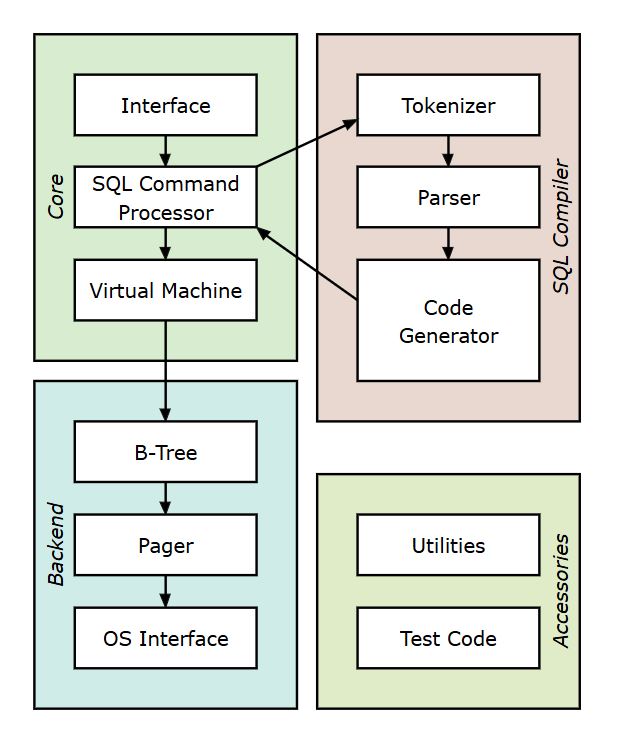
Understanding how databases work is fundamental for any software engineer. This post dives deep into the inner workings of database systems.
Contents
- Introduction
- Database Architecture
- Storage Engine
- Data Structures
- Query Processing
- Transaction Management
- Indexing
- Concurrency Control
- Recovery and Durability
- Query Optimization
- Conclusion
Introduction
Databases are complex systems that manage data storage, retrieval, and manipulation. Understanding their internal mechanisms helps us write better queries and design more efficient applications.
Database Architecture
Modern databases typically follow a layered architecture:
- Client Layer - Handles connections and authentication
- Query Processing Layer - Parses and optimizes queries
- Execution Engine - Executes query plans
- Storage Engine - Manages data on disk
- Transaction Manager - Ensures ACID properties
Storage Engine
The storage engine is responsible for:
- Physical storage of data on disk
- Buffer pool management
- Page organization
- Data compression
- I/O optimization
How Data is Stored
Data in databases is organized into pages (typically 4KB-16KB):
Page Structure:
├── Page Header
│   ├── Page ID
│   ├── Page Type
│   └── Free Space
├── Row Data
│   ├── Row 1
│   ├── Row 2
│   └── Row N
└── Page Footer
Data Structures
Databases use various data structures for efficient data access:
B-Trees
Most databases use B-Tree variants for indexing:
              [50]
             /    \
        [25]      [75]
       /  \       /  \
   [10][30]   [60][90]
Benefits:
- Balanced tree structure
- Logarithmic search time
- Efficient for range queries
Hash Tables
Used for equality searches:
// Hash index example
hashIndex = {
  hash(key1): pointer_to_data1,
  hash(key2): pointer_to_data2,
  ...
}
Query Processing
When you execute a query, several steps occur:
- Parsing - Convert SQL to internal representation
- Optimization - Choose the best execution plan
- Execution - Run the query plan
- Result Formation - Format and return results
Query Execution Plans
EXPLAIN SELECT * FROM users WHERE age > 25 AND city = 'NYC';

-- Possible execution plan:
-- 1. Index Scan on age_idx
-- 2. Filter by city
-- 3. Return results
Transaction Management
Databases ensure ACID properties:
- Atomicity - All or nothing execution
- Consistency - Valid state transitions
- Isolation - Concurrent transactions don’t interfere
- Durability - Committed changes persist
Transaction Example
BEGIN TRANSACTION;
  UPDATE accounts SET balance = balance - 100 WHERE id = 1;
  UPDATE accounts SET balance = balance + 100 WHERE id = 2;
COMMIT;
Indexing
Indexes speed up data retrieval but add overhead to writes:
-- Create an index
CREATE INDEX idx_user_email ON users(email);

-- B-Tree index structure
-- Speeds up: SELECT * FROM users WHERE email = 'user@example.com'
Index Types
- Primary Index - On primary key
- Secondary Index - On non-key columns
- Composite Index - On multiple columns
- Unique Index - Enforces uniqueness
Concurrency Control
Databases handle multiple concurrent transactions using:
Locking Mechanisms
- Shared Locks - Multiple reads allowed
- Exclusive Locks - Only one write allowed
- Intent Locks - Hierarchical locking
Multi-Version Concurrency Control (MVCC)
Transaction T1: READ data (version 1)
Transaction T2: UPDATE data (creates version 2)
Transaction T1: Still reads version 1 (snapshot isolation)
Recovery and Durability
Databases use Write-Ahead Logging (WAL):
- Write changes to log first
- Then modify actual data
- On crash, replay log to recover
WAL Log Entry:
[Transaction ID, Page ID, Old Value, New Value, Timestamp]
Query Optimization
The query optimizer chooses the best execution plan based on:
- Available indexes
- Table statistics
- Data distribution
- Cost estimation
Example Optimization
-- Original query
SELECT * FROM orders o
JOIN customers c ON o.customer_id = c.id
WHERE c.city = 'NYC';

-- Optimized plan:
-- 1. Filter customers by city first (smaller result set)
-- 2. Then join with orders
-- 3. Use index on customer_id for join
Conclusion
Databases are sophisticated systems that combine multiple computer science concepts:
- Data structures (B-Trees, Hash Tables)
- Algorithms (Query optimization, sorting)
- Concurrency control
- Storage management
- Transaction processing
Understanding these internals helps you:
- Write more efficient queries
- Design better database schemas
- Debug performance issues
- Make informed architectural decisions
As software engineers, having this foundational knowledge enables us to build more robust and performant applications.