· java · 2 min read
LDAP Authentication with Spring Boot LDAP

In this article, I will show how to achieve LDAP authentication using spring boot plugin for LDAP.
What you will need
- Java 8
- IntelliJ
- Apache Directory Server
- Apache Directory Studio
- Spring Boot
Implementation
To use LDAP for authentication with Spring Boot, definitely set up a LDAP server and we will use Apache Directory Server in our case. I will not be showing “How to set up and add LDIF entries” as this is entirely different topic. But I have two users John Doe and James Hook in my LDAP repository. I will use those accounts to login.
Set up Spring Boot with LDAP dependencies
As part of implementing this, we will add following gradle dependencies:
compile('org.springframework.boot:spring-boot-starter')
compile('org.springframework.boot:spring-boot-starter-web')
compile('org.springframework.boot:spring-boot-starter-security')
compile('org.springframework.ldap:spring-ldap-core')
compile('org.springframework.security:spring-security-ldap')
compile('org.springframework:spring-tx')
compile('org.apache.directory.server:apacheds-server-jndi:1.5.5')
For our task, spring-ldap-core and spring-security-ldap are important dependencies.
Rest Controller
We will create a simple rest controller that will display our sample page. This sample page will be secured and to access it, an user will have to authenticate.
package com.betterjavacode.SpringBootLdapApplication.Controllers;

import org.springframework.web.bind.annotation.GetMapping;
import org.springframework.web.bind.annotation.RestController;

@RestController
public class HomeController
{
    @GetMapping("/")
    public String index()
    {
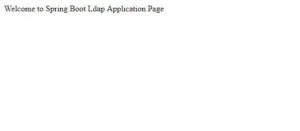
        return "Welcome to Spring Boot Ldap Application Page";
    }
}
Security Configuration
We will add our security configuration by adding a WebSecurityConfig class that extends WebSecurityConfigurerAdapter.
package com.betterjavacode.SpringBootLdapApplication;

import org.springframework.context.annotation.Configuration;
import org.springframework.security.config.annotation.authentication.builders.AuthenticationManagerBuilder;
import org.springframework.security.config.annotation.web.builders.HttpSecurity;
import org.springframework.security.config.annotation.web.configuration.EnableWebSecurity;
import org.springframework.security.config.annotation.web.configuration.WebSecurityConfigurerAdapter;

@Configuration
@EnableWebSecurity
public class WebSecurityConfig extends WebSecurityConfigurerAdapter
{
    @Override
    protected void configure(HttpSecurity http) throws Exception
    {
        http.httpBasic().and().authorizeRequests().anyRequest().authenticated().and().formLogin().and().csrf().disable();
    }

    @Override
    public void configure(AuthenticationManagerBuilder authenticationManagerBuilder) throws Exception
    {
        authenticationManagerBuilder
                .ldapAuthentication()
                .contextSource().url("ldap://localhost:10389/o=betterjavacode")
                .managerDn("uid=admin,ou=system").managerPassword("secret")
                .and()
                .userSearchBase("ou=people")
                .userSearchFilter("(uid={0})");
    }

}
Now if we look at this, when a user will launch the application, he will be challenged with a login form based on formLogin() . Once the user enters credentials, he will be redirected to home page.
The result for that will look like below:
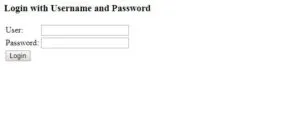
Once the user enters credentials:
Conclusion
In this post, we showed how to use LDAP for authentication using Spring boot.
References
- Spring Boot LDAP - Spring Boot LDAP
- Authentication using LDAP - LDAP Authentication
